
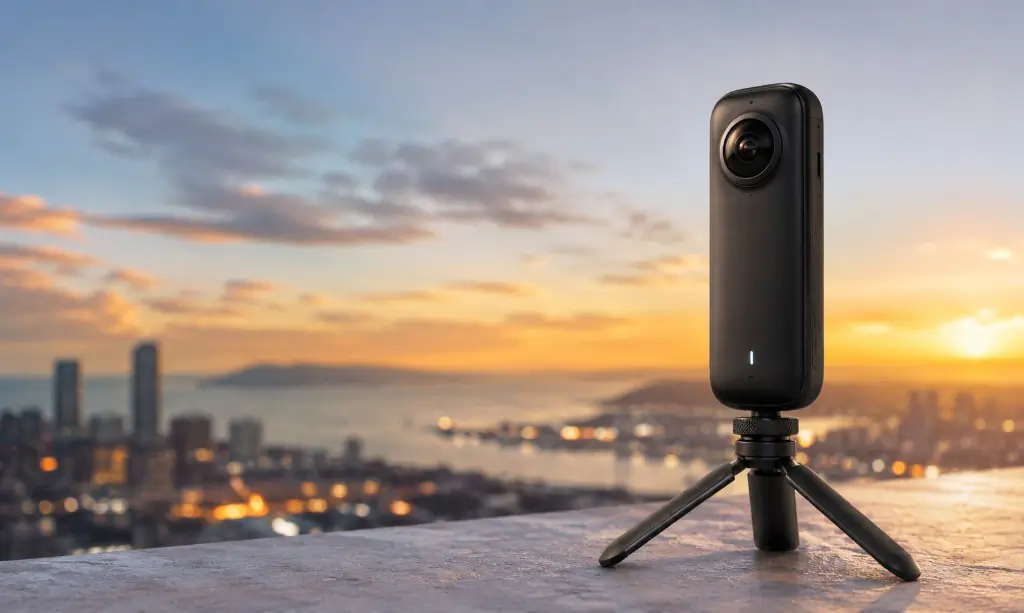
360 camera guide
360 Camera: The Complete Guide to 360° Cameras, Photography & Virtual Tours
How 360 cameras work, what to look for before you buy, which models suit virtual tours — and how to turn the panoramas you capture into an interactive tour you can publish and share.
Written by the Photoplan team · Updated August 2026
In short
A 360 camera is a digital camera that captures a complete spherical view of everything around it, usually using two opposing fisheye lenses whose images are stitched into a single equirectangular photograph or video. Instead of choosing where to point the camera, you capture every direction at once and let the viewer decide where to look — which is what makes 360 cameras the fastest route to an interactive virtual tour.
What is a 360 camera?
A 360 camera is a digital camera designed to capture a complete spherical view of its surroundings. Most consumer models achieve this with two ultra-wide fisheye lenses mounted back to back, each capturing roughly half of the environment.
Software then combines — or stitches — those two images into a single spherical photograph or video covering almost everything around the point of capture.
Instead of deciding which direction to point the camera before you press the shutter, you capture every direction at once and the viewer chooses where to look. That single difference is what makes 360 photography so well suited to virtual tours and immersive experiences.
Once specialist equipment, 360 cameras are now compact and affordable enough that property photographers, estate agents, construction teams, travellers, educators and businesses all use them routinely.
How does a 360 camera work?
A typical 360 camera contains:
- Two opposing fisheye lenses
- Two image sensors
- On-board image processing and automatic stitching
- Wi-Fi and Bluetooth connectivity
- A companion smartphone or desktop application
When you press the shutter, both lenses capture their view at almost exactly the same moment. The overlapping images are processed and stitched into one complete sphere.
Displayed as a flat photograph the result looks strange — a wide, stretched panorama roughly twice as wide as it is high. Loaded into 360 viewing software, that same flat image is wrapped around the viewer to recreate the original space, which you can then explore by dragging with a mouse, moving a phone or putting on a VR headset.
What is an equirectangular 360° image?
If you have opened a 360 photograph outside a tour viewer, you have seen an equirectangular projection: an unusually stretched image with a 2:1 aspect ratio, for example 8,000 × 4,000 pixels.
That flat file holds all the information needed to reconstruct the full sphere. Virtual-tour software maps it onto the inside of a virtual sphere — imagine standing inside a giant ball with the photograph projected onto its interior. That is essentially how every 360 viewer works.
Equirectangular JPEG is the common language of 360 photography. As long as your camera exports it, your images will work with almost any virtual-tour platform.
Applications
What are 360 cameras used for?
Capturing an entire environment in one shot turns out to be useful across a very wide range of industries.
Virtual tours
Link individual 360 photographs with hotspots so visitors can walk from room to room, floor to floor or location to location at their own pace.
Property marketing
One capture position per room produces an interactive walkthrough buyers and tenants can explore before committing to a physical viewing.
Construction records
A single spherical image holds far more of a site than a conventional photograph. Repeat the same positions weekly and you build a visual project record.
Travel and tourism
Capture the whole location rather than one landmark — hotels, beaches, attractions and city centres explored interactively or in 360 video.
Education and training
Place learners inside museums, laboratories, historic sites or workplaces they could not otherwise visit, on screen or through a VR headset.
Retail, hospitality and events
Show venues, restaurants, showrooms and event spaces as they really are, so enquiries arrive already knowing the layout and scale.
This is what 360 photographs become
Every scene in this tour started as a single equirectangular photograph from a 360 camera. Hotspots connect the rooms, so a buyer can walk the property in their own time — the same technique used for hotels, schools, museums, showrooms and construction records.
Modern platforms go well beyond linking photographs together. Tours can carry video, audio narration, information panels, floor plans, branding, navigation and contact forms.
Property, construction and site documentation
Property photography and estate agency
360 cameras have become particularly useful in property marketing. A photographer positions the camera in each room and captures the whole space from a single position; the images are then connected into an interactive walkthrough that buyers explore before arranging a physical viewing.
For agents, developers and photographers, that makes 360 a relatively inexpensive way to add immersive marketing alongside conventional photography, floor plans and video.
Construction and site records
Because the camera records everything around it, one image holds far more information than a conventional photograph. Repeating the same positions over time creates a visual record of how a project develops, which helps with:
- Progress monitoring and site records
- Remote inspections and stakeholder updates
- Dispute resolution and evidence
- Handover documentation and facilities management
Travel, education and VR
Travel suits 360 naturally: rather than pointing at one landmark you capture the whole location. In education, 360 photography can place learners inside a historic site, laboratory, museum or rainforest — and through a VR headset the effect becomes considerably more immersive.
A short history of 360° photography
Capturing an extremely wide field of view is much older than the digital 360 camera. Photographers experimented with panoramas in the nineteenth century, joining several photographs side by side or using specialised cameras that rotated or exposed film across a much wider field of view. The objective was the same as today: capture more of the environment than a normal photograph allows.
Digital photography changed the economics. Instead of physically joining prints, software could combine digital frames, so photographers put conventional cameras on tripods and rotated through carefully overlapping exposures. That technique is still used where extremely high-resolution panoramas are needed.
Large-scale street-level imagery then made interactive panoramas mainstream. Millions of people became comfortable navigating real places by moving between connected panoramic photographs.
The final step was making capture simple. Compact cameras with multiple wide-angle lenses could record the whole environment almost instantly, and products such as the Ricoh Theta showed that 360 photography did not require professional equipment. Manufacturers including Insta360 and Kandao pushed further, and today’s pocket-sized cameras offer high-resolution stills and video, HDR, stabilisation, automatic stitching and sophisticated editing tools.
Recommendations
Best 360 cameras
There is no single 360 camera that suits everyone. Someone filming skiing has very different needs from a photographer producing interior virtual tours, so choose by use case rather than specification alone.
This article contains Amazon affiliate links. As an Amazon Associate, Photoplan earns from qualifying purchases. This does not change the price you pay, and it does not affect our recommendations.
Best all-round 360 camera
Pros
- High-resolution 360 photos and video from a single press of the shutter
- Strong low-light video processing for interiors and evening capture
- Replaceable lens guards — practical for site work and travel
- Mature phone app for stitching, reframing and export
- Doubles as an action and social camera between jobs
Cons
- Small sensors cannot match a 1-inch-sensor camera in very dark rooms
- Video-first feature set is more than a virtual-tour photographer needs
- Batteries and cards add up across a full day of shooting
If you want one camera that handles immersive video and 360 stills, the X5 is the obvious starting point. Its compact format suits travel, outdoor activity and content creation, and the stills are more than good enough for everyday virtual tours.
Best 360 camera for professional virtual tours
Pros
- Built around still 360 photography rather than action video
- Touchscreen makes framing, settings and review quick on site
- Predictable stitching that virtual-tour platforms handle well
- Removable battery and microSD card for long shooting days
- Exports standard equirectangular JPEGs with no conversion step
Cons
- Lower resolution than the latest Insta360 models
- Limited appeal if you also want cinematic 360 video
- Low-light performance sits behind the Theta Z1
The Theta range has long been associated with virtual-tour photography, and the X continues that. If your priority is capturing consistent static panoramas quickly across a lot of rooms, it is a more focused tool than an action-led camera.
Premium 360 camera for property photography
Ricoh Theta Z1
Best for: Interior photography, property and professional virtual tours
Check price on AmazonPros
- Dual 1-inch sensors — the largest in a mainstream consumer 360 camera
- Cleanest results in dark kitchens, hallways and north-facing rooms
- RAW capture for professional editing workflows
- Wide dynamic range reduces artefacts around bright windows
- A long-standing favourite of professional tour photographers
Cons
- Expensive next to consumer alternatives
- Older design with a slower transfer workflow
- Lower headline resolution than newer 8K cameras
- Hard to justify for occasional use
Where still-image quality matters more than the newest video features, the Z1 remains the benchmark. Its larger sensors show their value in exactly the conditions UK property throws at you — dim interiors, mixed lighting and bright windows.
Best value 360 camera
Pros
- 8K capture at a lower price now a newer model has launched
- Same one-press workflow and app ecosystem as the X5
- Rugged and waterproof enough for exteriors and site work
- Widely supported by virtual-tour platforms
- A sensible first camera if you are testing 360 as a service
Cons
- Superseded, so expect fewer new firmware features over time
- Small sensors limit quality in very low light
- Stitch lines can show near close furniture and doorways
Previous-generation cameras often represent the best value in 360, and the X4 is a good example. It remains a capable camera for anyone who does not need everything the current model offers.
For a deeper comparison including professional scanning systems, see our best 360 camera for virtual tours buyer guide.
Buying criteria
What is the best 360 camera for virtual tours?
For tours, photographic quality matters more than extreme video specifications. These are the six things worth checking before you buy.
Still-image resolution
More detail means a sharper experience when someone zooms into the panorama, which is exactly what buyers do when a room interests them.
HDR performance
Interiors combine dark corners with extremely bright windows. HDR preserves detail at both ends instead of forcing you to choose.
Low-light performance
Interior spaces are rarely brightly lit. Larger sensors produce cleaner, less noisy panoramas in period properties and basement rooms.
Stitching quality
Poor stitching creates visible distortion where the two lens views meet — most noticeable on furniture, door frames and worktops.
Workflow speed
Transfer and processing time matters far more once you are photographing several properties a day rather than one at a weekend.
Compatibility
Check the camera exports standard equirectangular JPEGs so your images upload into any virtual-tour platform without a conversion step.
Best 360 camera for estate agents
Estate agents rarely need a cinematic 360 video production system. The priorities are speed, simplicity, consistent image quality and results you can rely on without a specialist operator.
The camera should be small enough to carry alongside normal property kit and quick enough to cover an average property without extending the appointment. Where tours are produced in-house, ease of use frequently matters more than ultimate image quality — a slightly softer tour that actually gets published beats a perfect one that never does.
Best 360 camera for property photographers
If you are charging clients for 360 tours, the balance shifts towards image quality and control. Pay closer attention to dynamic range, sensor size, HDR, resolution, RAW capability, manual exposure, stitching quality and workflow speed.
Also consider where 360 fits in your wider service. If you are already visiting a property for photographs and a floor plan, adding a set of panoramas can create an additional revenue line without a second appointment.
How 360 cameras compare
360 camera vs smartphone
Modern smartphones contain extraordinarily capable cameras, but capturing a genuine spherical photograph with one is far less convenient than using a dedicated 360 camera.
A 360 camera captures almost everything simultaneously. A smartphone panorama requires you to physically move the phone through the scene, and that movement causes problems whenever people or objects move.
For the occasional panorama, a phone may be enough. For regular virtual-tour work, a dedicated 360 camera is a far more practical tool.
360 camera vs DSLR or mirrorless
Professional 360 panoramas can also be created with a conventional interchangeable-lens camera, a specialist panoramic head and a suitable lens, rotating through a series of overlapping exposures that are stitched afterwards.
That approach produces exceptional image quality and extremely high-resolution panoramas, but it is considerably slower.
A dedicated 360 camera prioritises speed and convenience; a multi-shot setup prioritises maximum quality and control. Neither is better — they solve different problems.
360 camera vs Matterport
These technologies are related but are not direct equivalents. A 360 camera captures spherical photographs or video; Matterport provides a broader spatial-capture and digital-twin ecosystem.
For businesses that mainly want an attractive interactive tour, a 360 camera paired with virtual-tour software offers more flexibility and a much lower cost of entry.
Where a project genuinely needs spatial data, measurement or a digital twin, a specialist scanning ecosystem makes more sense. The right answer depends on the project.
Technique
How to take better 360 photos
A good camera does not guarantee a good 360 photograph. These habits make the difference between a tour that feels natural and one that feels awkward.
- 1
Position the camera carefully
The camera position becomes the viewer position. Imagine where someone would naturally stand, avoid placing it hard against walls or large furniture, and favour a roughly central spot.
- 2
Keep it level
A level camera produces a natural horizon. A leaning camera makes rooms and buildings look subtly distorted in a way viewers notice even if they cannot name it.
- 3
Use a slim tripod or monopod
Because the camera sees almost everything, a bulky tripod dominates the frame. Narrow monopods and dedicated 360 stands keep the nadir clean.
- 4
Leave the room
The camera can see behind itself. Use the timer or the phone app and stand somewhere the camera cannot see you — usually the next room.
- 5
Watch the mirrors
The classic property mistake: hiding successfully from the camera, only to appear in a bathroom or wardrobe mirror. Check reflective surfaces before you shoot.
- 6
Plan for windows
Bright exteriors against darker interiors are the hardest exposure in property. Use HDR, and shoot rooms at the time of day their light works best.
Step by step
How to create a virtual tour with a 360 camera
This is far easier than most people expect — capture, export, upload, connect, publish.
- 1
Capture your 360 photographs
Work through the location one position at a time. For a house that usually means the hallway, living room, kitchen, each bedroom, the bathroom and the garden.
- 2
Export the images
Process in the camera app if needed, then export standard equirectangular JPEGs — the 2:1 format every virtual-tour platform expects.
- 3
Upload your panoramas
Drop the images into your virtual-tour software. Order them the way a visitor would naturally move through the space.
- 4
Connect the scenes
Add hotspots so visitors can walk the route: hallway to kitchen to living room to garden, and back again.
- 5
Add interactive content
Layer in information hotspots, photos, video, a floor plan, audio narration, branding and a clear call to action.
- 6
Publish and share
Publish the tour, then share the link or embed it in your listing, website, email campaigns and social posts.
Already own a 360 camera?
Turn your 360 photos into an interactive virtual tour
Your photographs are only the beginning. With 360 Tours Studio you can turn equirectangular images into an immersive experience without any coding — upload your panoramas, connect the scenes, customise the viewer and publish a branded tour you can share or embed anywhere.
Upload your 360 photosBuild your tourPublishShare
VR, 360 video and software
Can you view 360 camera images in VR?
Yes. 360 photographs suit virtual reality particularly well, because the viewer looks around the captured space naturally and a headset produces a far greater sense of presence than a flat screen.
A headset is not required, though. The same content works on desktops, laptops, tablets and phones, which is exactly why browser-based tours are so accessible — visitors explore normally and switch to VR only if they want to.
360 photography vs 360 video
Both come from the same cameras but behave differently. A 360 photograph captures a single moment and is ideal for virtual tours, because the viewer explores at their own pace. 360 video records the whole environment continuously, letting the viewer choose where to look while it plays — better suited to movement, travel, sport, training and storytelling. Most modern cameras do both.
Do you need special software?
Usually for part of the workflow. Manufacturers provide apps for stitching, processing and transferring files. Once an image is in standard equirectangular format it works with a wide range of applications, and for tours you need software that can display the panorama and connect multiple locations together.
How much does a 360 camera cost?
360 cameras span a broad range. Entry-level consumer models cost a few hundred pounds; specialist professional systems run into thousands.
Do not choose on price alone. For tour work in particular, budget for the whole workflow: camera, tripod or monopod, processing time, virtual-tour software and hosting. A slightly more expensive camera that saves time on every property can be better value for a professional.
Is a 360 camera worth buying?
For many photographers and businesses, yes. One compact camera covers virtual tours, property marketing, construction documentation, tourism, social media, immersive video and VR content.
For professional users the sharper question is whether you can earn from it. A property photographer can add 360 tours as an extra service alongside photography and floor plans, and once the camera is paid for, the incremental cost of each additional tour is low.
Frequently asked questions about 360 cameras
Keep reading
Related services and guides
Photoplan captures, edits and hosts 360 virtual tours nationwide — or gives you the tools to publish your own.
Rather not buy a 360 camera?
Photoplan captures, processes and hosts branded 360 virtual tours for estate agents, developers and commercial clients across the UK.
Estate agents book through the app · One-off customers order in the shop · or contact us